Thank you for choosing Chinavasion!
- Paypal
- Credit Card
- Bank Transfer
Credit Card Checkout Instruction
Unpaid Orders
Sending Money With Paypal
Sending Money With Credit Card Directly
How to re-activate an unpaid order?
Links To More Chinavasion Resources
If you are reading this page, it's probably because you just completed an order at Chinavasion.com - Thanks, and we look forward to giving you excellent products and service!

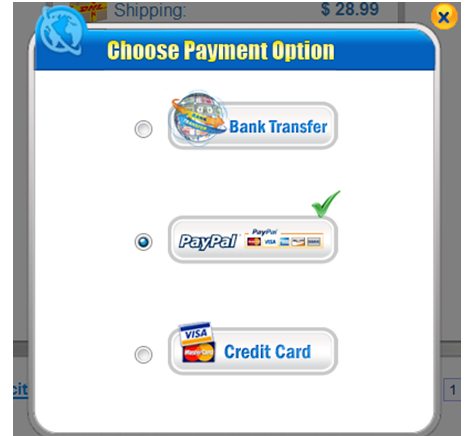
Chinavasion orders accept the following methods:
-
Paypal
Paypal is a Payment processor owned by eBay, and it's the world's biggest and most trusted online payment system. Paypal is used and trusted by millions of eBay shoppers and other ecommerce buyers worldwide.
For users in most countries, you can pay using your credit card through Paypal.It's easy to use and secure, as well as offering you strong customer protection.
Paypal is suitable for any kind of purchase at Chinavasion.com, up to a limit of USD $3000 for most countries. Read more notes about Paypal here. Credit Card
Chinavasion has launched a safe Credit Card payment. For this new payment method, you can pay us without having any PayPal account. Credit Card will be available for you if Paypal has a service in your country. Please click here for a list of countries where Paypal is available.
If your country is not on the list, you can't use Credit Card nor Paypal. Click here for a list of Paypal enabled countries: List of Paypal enabled countries
Is it safe to pay by credit card directly?
You're right to be concerned. Always be careful where you send your confidential data.In this checkout payment process it's safe because:- Payments by credit card directly are 100% secure and confidential. Chinavasion has no access to your payment details.
- The money you send us will be collected through PayPal secure servers first before reaching our account.
- Credit payment option is usually available for most websites nowadays.
-
Bank Transfer
Bank transfer is a way to send money internationally from one bank account directly to another. It is also known as bank draft, international transfer, and telegraphic transfer (T/T). Most banks will allow you to send an international bank transfer from your account, although they may not provide information publically about this procedure. You will probably have to go to your bank in person and sign papers to authorize the transfer. You will also have to supply full details of Chinavasion's bank account, and a reference for your order number so we can match your payment to your order. In certain banks/countries you also need to provide an invoice for the purchase, and in most cases a printout from your Chinavasion account will suffice. Depending on your bank and your country, the bank transfer may take 1-10 working days to complete: you can request details about timing from your bank. You can find full details of how to send payment to Chinavasion via Bank Transfer here. Bank Transfer is generally suitable for medium and larger purchases. Please note your bank may charge you small fees for the transfer and these charges are your responsibility.

Credit Card Checkout Instructions
»To see a short help video about how to select the Credit Card payment option in the Chinavasion checkout, click on this link: http://screencast.com/t/i4NHNdhc

The third box in the checkout shows you the currently selected payment method.

Click the red link to open a popup to change to Credit Card

After you select this option, click 'Place Your Order' to go to the payment
process in the secure Paypal website.


Your payment will be processed securely by Paypal.
Your card details are not sent to Chinavasion or seen by our staff.
Even using the Credit Card payment method, all refund / cancellation requests, or payment queries can still be handled via Chinavasion customer support.
Unpaid Orders
After you complete an order on Chinavasion.com you can pay for the goods and get the order processed within a three week period. (If prices have changed we reserve the right to request that you make an order at up-to-date rates.)
You can see the details of all your completed orders in your Chinavasion.com account:
- If you chose Bank Transfer in the Chinavasion.com checkout, and you now want to pay by Paypal, you need to use the "Send Money" feature of Paypal. The address to send payment to is:
 We will send you an email acknowledgement once your payment has been matched to your order - please allow one working day.
(Please do not email that address for support issues, you will not receive a response - submit a help ticket instead.)
We will send you an email acknowledgement once your payment has been matched to your order - please allow one working day.
(Please do not email that address for support issues, you will not receive a response - submit a help ticket instead.)
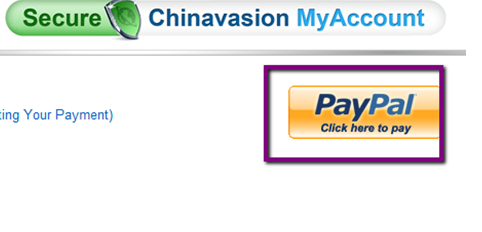
- If you chose Paypal in the Chinavasion.com checkout, and you still want to pay by Paypal: Go to your Chinavasion.com account select the order you want to pay and click “ Paypal click here to pay”
- If you chose Paypal in the Chinavasion.com checkout, and you now want to pay by Bank Transfer, please click here to learn about how to send a bank transfer.
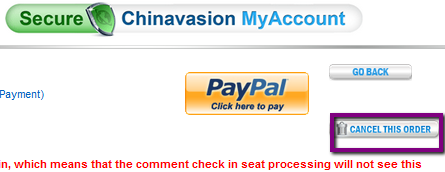
- If you do not want to pay for any order, you can just ignore it and it will automatically expire after 21 days. Or you can expire your unpaid order by clicking the button “ CANCEL THIS ORDER”
Sending Money With Paypal
If you didn't use the online checkout, you can still send a payment using Paypal's "Send Money" feature. Paypal takes funds from your Paypal account, or from your credit card / bank account, and sends this Money to Chinavasion. You still have all the same customer security, rights, and protections that you do with normal Paypal checkout payments.
Using the Paypal "Send Money" feature is an easy step-by-step process. You can begin here: https://www.paypal.com/us/cgi-bin/webscr?cmd=_send-money&nav=0.1
The address to send payment to is:
Make sure you state your name, address, and order number (find out your order numbers here) - and we will match your payment to your order within one working day, and notify you that your order is processing.
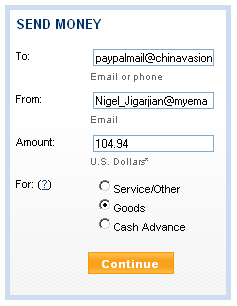
Enter Chinavasion's payment email address in "To" and your own email address in "From".The "Amount" is the total price of your order including shipping.You should select "Goods" for the category of the payment.
Paypal offers a slideshow introduction to Send Money here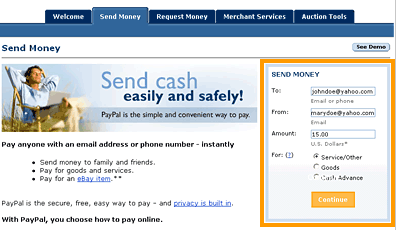
Sending Money With Credit Card Directly
If you do not have a Paypal account you can pay by your credit card directly.
How to pay Chinavasion by Credit card:
- In the check out, please select “ credit card “ as the payment method;
- Then follow these steps to pay by credit card directly.
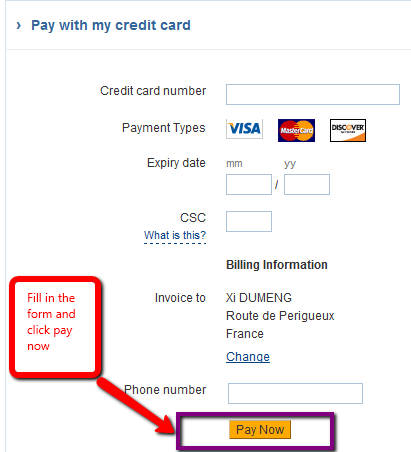
How to re-activate an unpaid order?
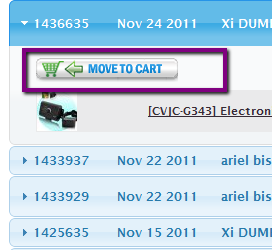
- Option 1: If you have an unpaid order where you selected the wrong payment method or shipping address please use the "Move to cart" function
- Option 2: Copy and paste the following URL to your web browser: https://secure.chinavasion.com/checkout/index.php?orderid=000000, and replace the 000000 with your order number. This will allow you to replace the same order without having you to back to the website
Links To More Chinavasion.com Help Articles About Payments
Payment Methods:
- Payment Methods Accepted
- What's Your Paypal Address?
- How To Make Bank Transfers - Paying For Chinavasion Orders By Bank Transfer
- If You Chose Bank Transfer But Now Want Paypal
More About Bank Transfers:
- What Currency For Bank Transfers?
- Bank Transfer Fees
- How To Print Invoices Yourself
- Bank Transfers, Confirmations, and Trust!
More Key Information:
- How Does Paypal Work, Generally Speaking?
- Advantages of Paypal / Bank Transfer Payment Methods
- New Customer? Read About: Payment Verification
- Is Shipping Included In The Price?
- Do I Have To Pay VAT / Sales Tax?
- Viewing Prices In Different Currencies
- My Country Isn't Available In Paypal!
- Can I Pay By Credit Card?